Settings → Email
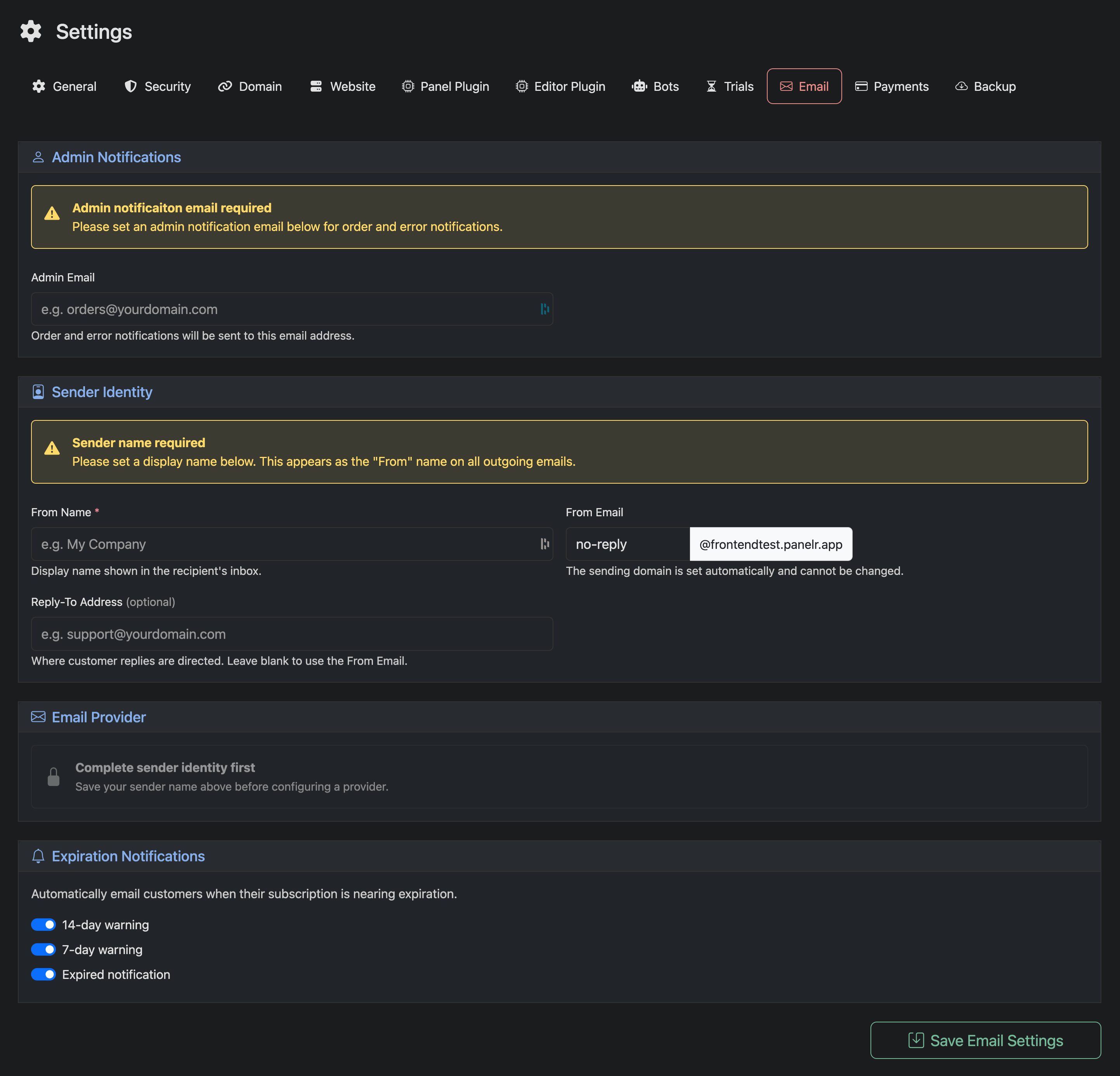
Use this page to configure how emails are sent from your Panelr installation, including admin notifications, sender identity, and customer notifications.
Admin Notifications
Admin Email
Required. Enter the email address that will receive order and system error notifications.
Sender Identity
From Name
Required. This is the display name shown as the sender in customer inboxes.
From Email
The sending address used for all outgoing emails. The domain is automatically assigned by Panelr and cannot be changed.
Reply-To Address (optional)
Set where customer replies should be sent. If left blank, replies will go to the From Email.
Email Provider
You must complete and save your sender identity before configuring an email provider. Once your sender details are set, you can choose from the following built-in email providers in Panelr:
- Postal (transactional email provided by Panelr)
- SendGrid
- Resend
- Mailgun
- Send Pulse
- SMTP (PHPMailer)
Select the provider that best fits your setup and enter the required credentials to begin sending emails.
All installations include built-in transactional email support via Panelr MailFactory, which is pre-configured and ready to use by default. No additional setup is required to send emails.
Expiration Notifications
Enable automatic emails to notify customers as their subscription approaches expiration.
- 14-day warning
- 7-day warning
- Expired notification
These notifications help reduce churn and prompt renewals automatically.