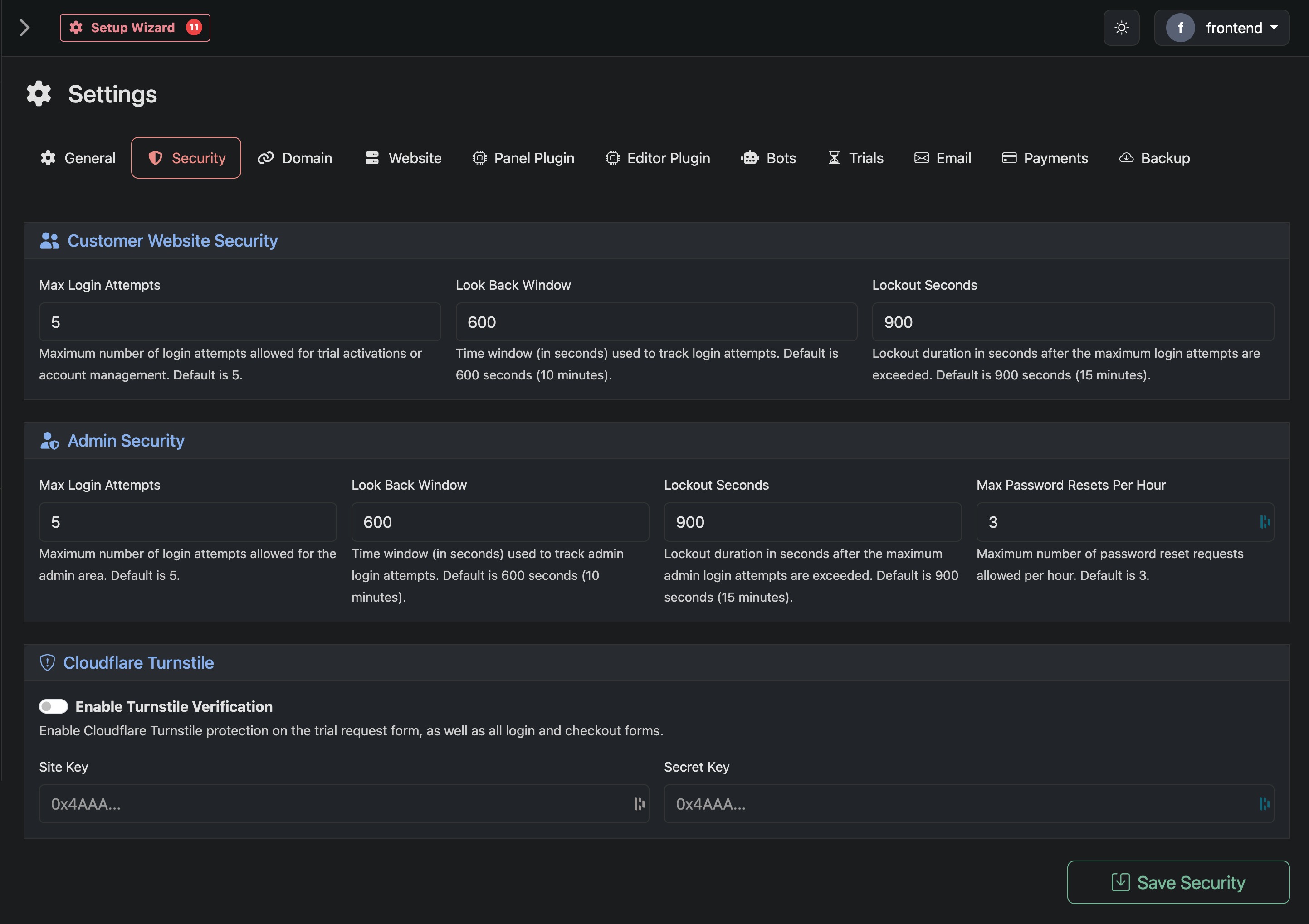
Use this page to control login protection, rate limiting, and bot prevention for both your customer-facing website and admin area. These settings help prevent brute force attacks and abuse.
Customer Website Security
Max Login Attempts
Maximum number of login attempts allowed for customer actions such as trial activations or account management. Once this limit is reached, the user is temporarily blocked.
Look Back Window
Time window in seconds used to track login attempts. Attempts within this window are counted toward the limit.
Lockout Seconds
How long a user is locked out after exceeding the maximum login attempts.
Admin Security
Max Login Attempts
Maximum number of login attempts allowed for the admin area. Helps protect against unauthorized access.
Look Back Window
Time window in seconds used to track admin login attempts.
Lockout Seconds
Duration in seconds that admin access is blocked after too many failed attempts.
Max Password Resets Per Hour
Limits how many password reset requests can be made per hour. Prevents abuse of the reset system.
Cloudflare Turnstile
Enable Turnstile Verification
Adds bot protection to key forms including trial requests, login, and checkout. Helps prevent automated abuse without impacting real users.
Site Key
Public key provided by Cloudflare. Used to load Turnstile on your forms.
Secret Key
Private key used to verify Turnstile responses on your server. Keep this secure and never expose it publicly.