Panel Bouquets
Panel Bouquets
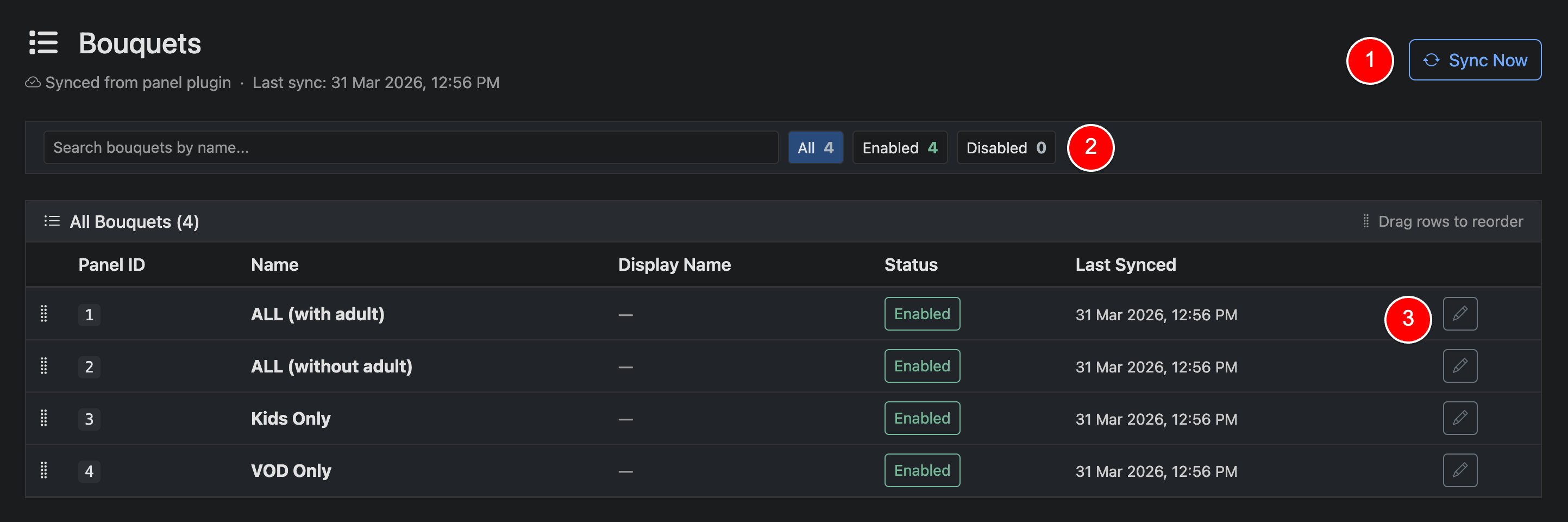
Panel bouquets are used when a panel plugin is connected without an editor. In this mode, bouquets are pulled directly from your panel and reflect the provider’s predefined content groupings.
Sync Now (1)
Click Sync Now to refresh bouquets from your panel. Syncs also run automatically in the background, so manual syncing is typically not required.
Search & Filter (2)
Use the filters to quickly view All, Enabled, or Disabled bouquets and manage visibility.
Edit (3)
Click the edit icon to update bouquet settings such as display name or enabled status.
Panel bouquets are managed by your provider and cannot be created manually in Panelr.
Depending on your panel, you may only be able to assign one bouquet at a time. In this case, the selection interface will use radio buttons instead of checkboxes.
These bouquets often contain large, provider-defined category structures and are used directly during provisioning.
If you have a panel plugin activated, be sure to set the default panel bouquet in the Panel Plugin settings