Edit a Product
Edit a Product
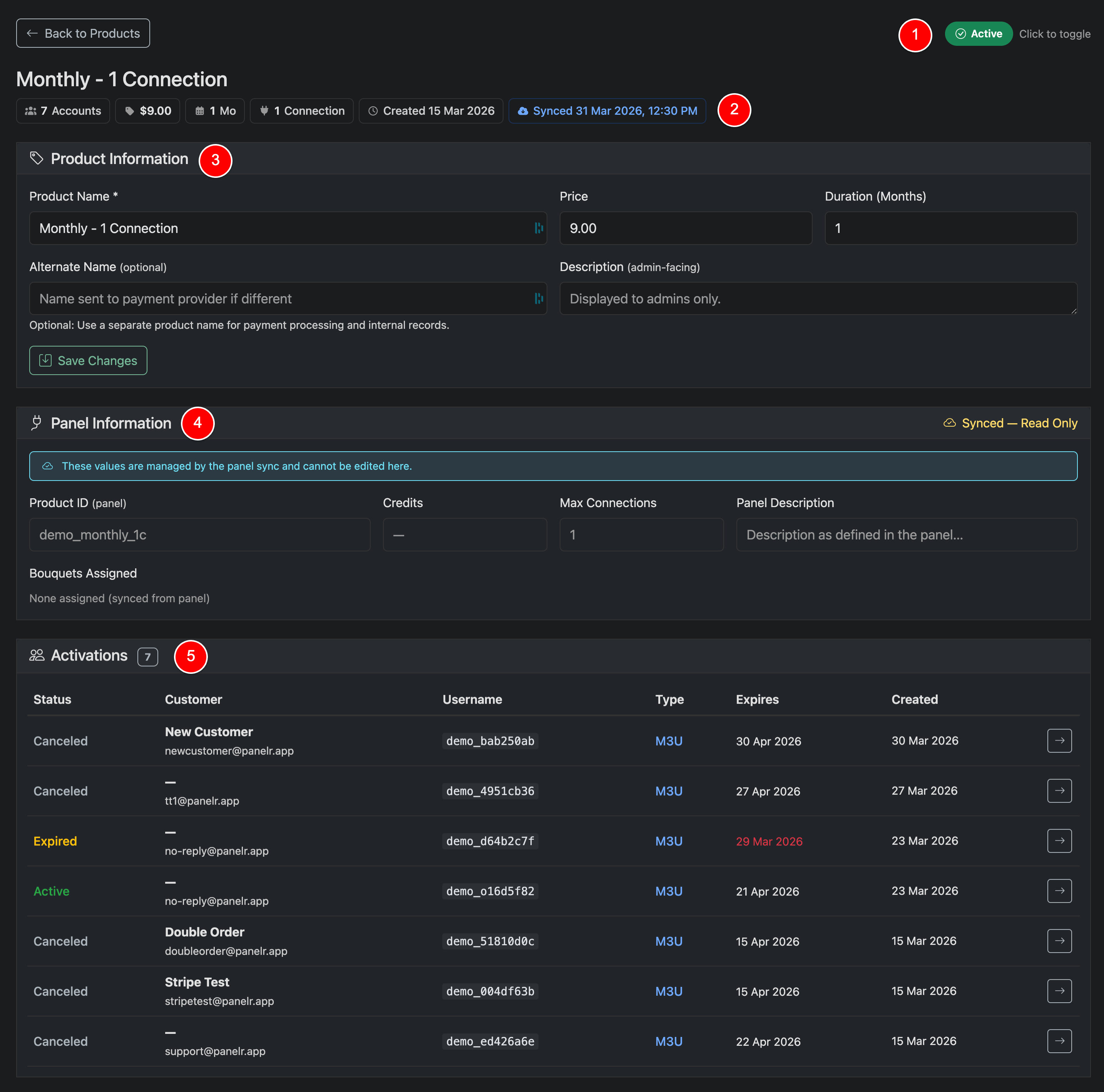
The product detail page allows you to update pricing, visibility, and view how a product is being used.
You can quickly toggle the product’s Active status at the top of the page (1). Changes take effect immediately.
Status Toggle (1)
Quickly toggle the status of the product: active/inactive
Product Overview (2)
Quick top-level overview of the product
Product Information (3)
Update core details such as name, price, and duration. These are the values used across checkout, work orders, and customer-facing flows. Click Save Changes to apply updates.
Panel Information (4)
If your product is synced from a panel, this section is read-only. Values such as Product ID, connections, and bouquets are managed by the panel and updated during sync.
If you are using manual products, this section reflects the configuration used for provisioning.
Activations (5)
This section shows all lines created using this product. You can view status, customers, usernames, and expiration dates. Use this to quickly audit usage and access related lines.
This page gives you full visibility into how a product is configured and how it’s being used across your system.