Custom Hosts
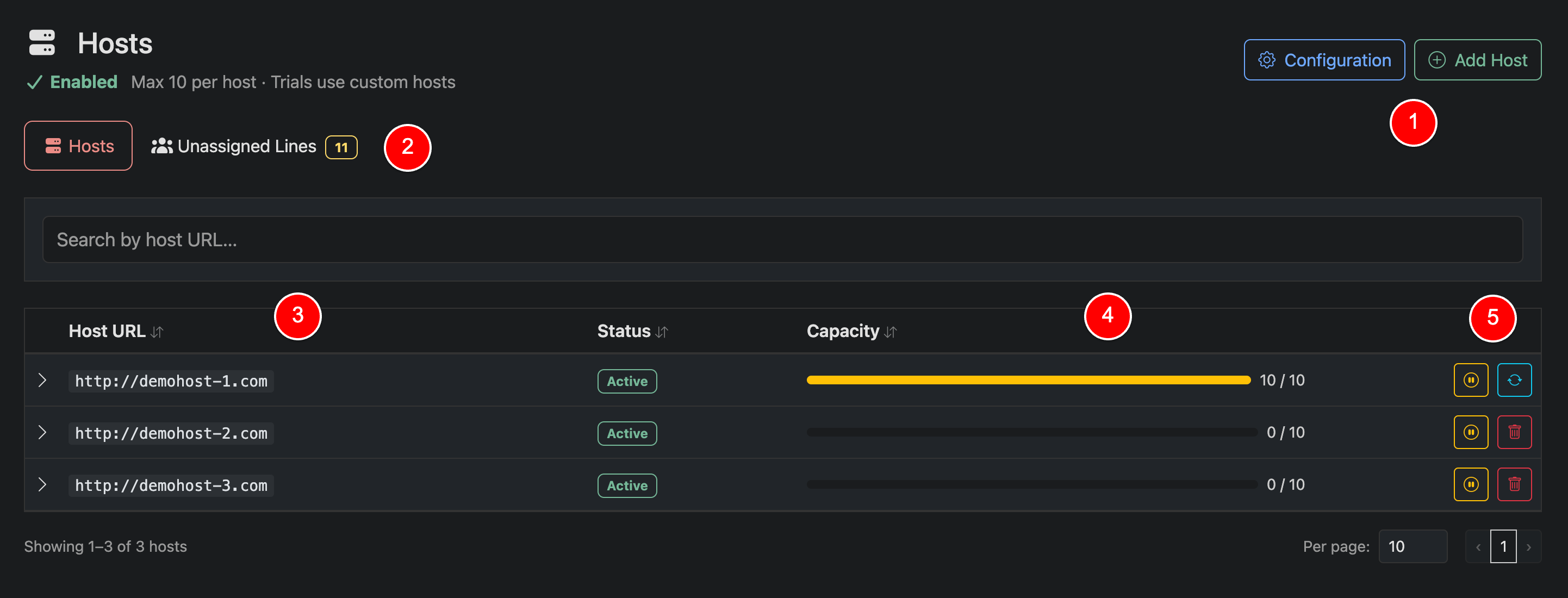
Hosts are URLs that point to your connected panel or editor and are used when provisioning customer lines. Each customer is assigned to a host, allowing you to distribute load and control how many users connect through a single endpoint.
Hosts help prevent overloading a single URL by enforcing capacity limits. You can also configure whether trials use dedicated hosts.
If you are using an editor, or your panel does not return full connection URLs, Custom Hosts must be enabled and configured.
Interface Guide
Add Host / Configuration (1)
Use Add Host to create a new host URL and define its capacity. Use Configuration to control global host behavior, including limits and trial host settings.
Unassigned Lines (2)
Shows the number of lines not currently assigned to a host. These should be reviewed and assigned to ensure proper distribution and functionality.
Host List (3)
Displays all configured host URLs. Each host represents a connection endpoint used during provisioning. These URLs can be expanded to view subscribers assigned to the listed host.
Capacity & Usage (4)
Shows how many users are assigned to each host versus its maximum capacity. This helps you balance load and avoid over-utilization.
Host Actions (5)
Manage each host:
- Enable or disable a host
- Migrate users between hosts
- Delete a host (if applicable)