Products Overview
Products Overview
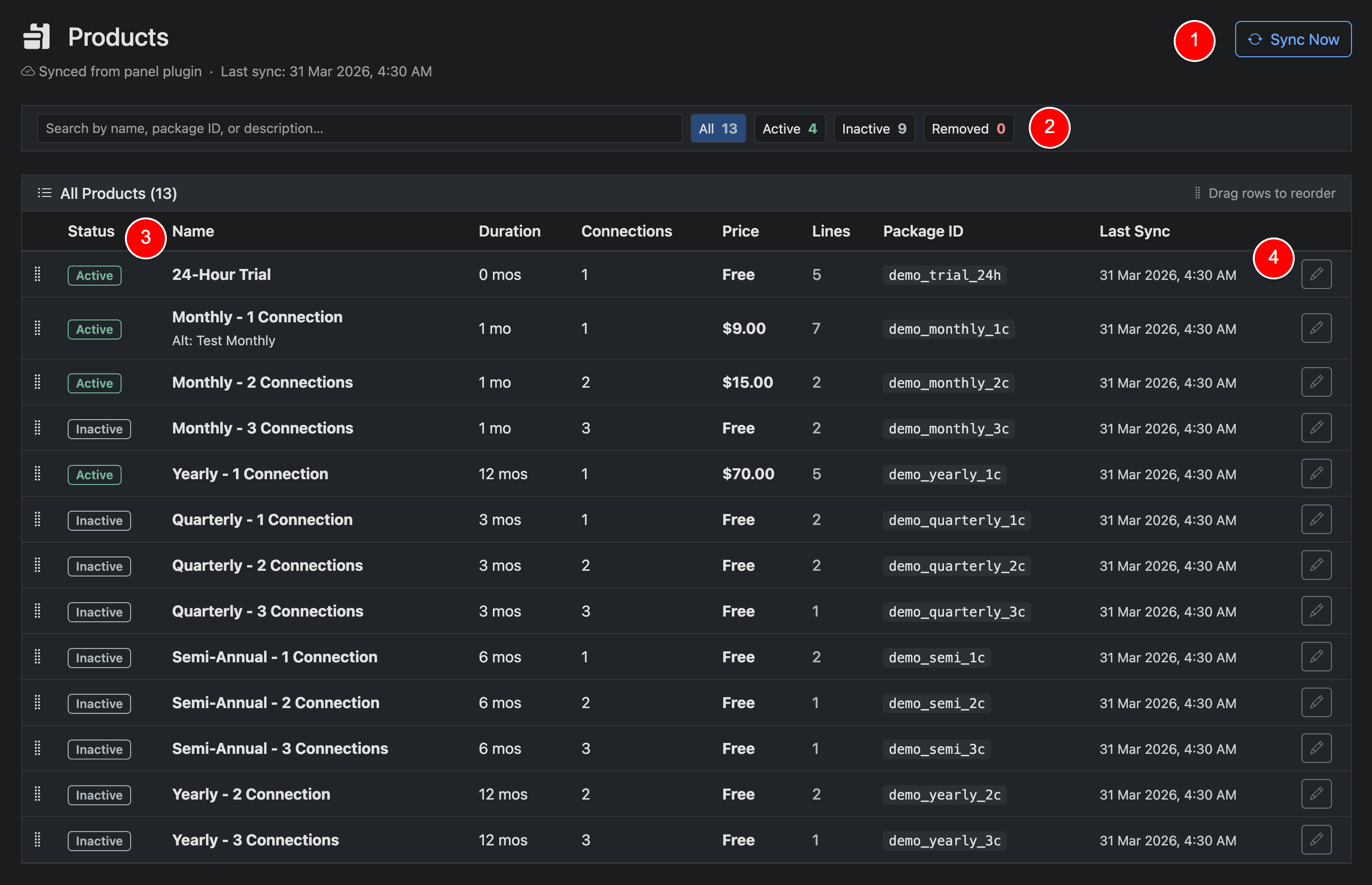
The Products page is where you manage the plans and packages offered to your customers. This includes pricing, duration, connections, and availability.
If a panel plugin with product support is connected, products are automatically synced from your panel. Clicking Sync Now will refresh and update your product list to match the panel.
If no plugin is connected—or the plugin does not support products—you will need to manually create and manage your products within Panelr.
Use the filters to quickly view Active, Inactive, or Removed products. Each row shows key details including duration, connections, price, and how many active lines are using that product.
Products can be enabled or disabled at any time, and reordered to control how they appear throughout the system.
The 'lines' count in the table will show how many lines you current have subscribed to the listed product.
Quick Actions
Sync Now (1)
Force a sync between Panelr and your panel to refresh available products. Syncs run automatically in the background, so manual syncing is typically not required.
Search & Filter Bar (2)
Quickly search, filter and sort the products you offer.
Status (3)
Click the status label to quickly toggle a product between active and inactive.
Edit Product (4)
Click the product edit icon to toggle to edit the product.