Manage Lines
Lines
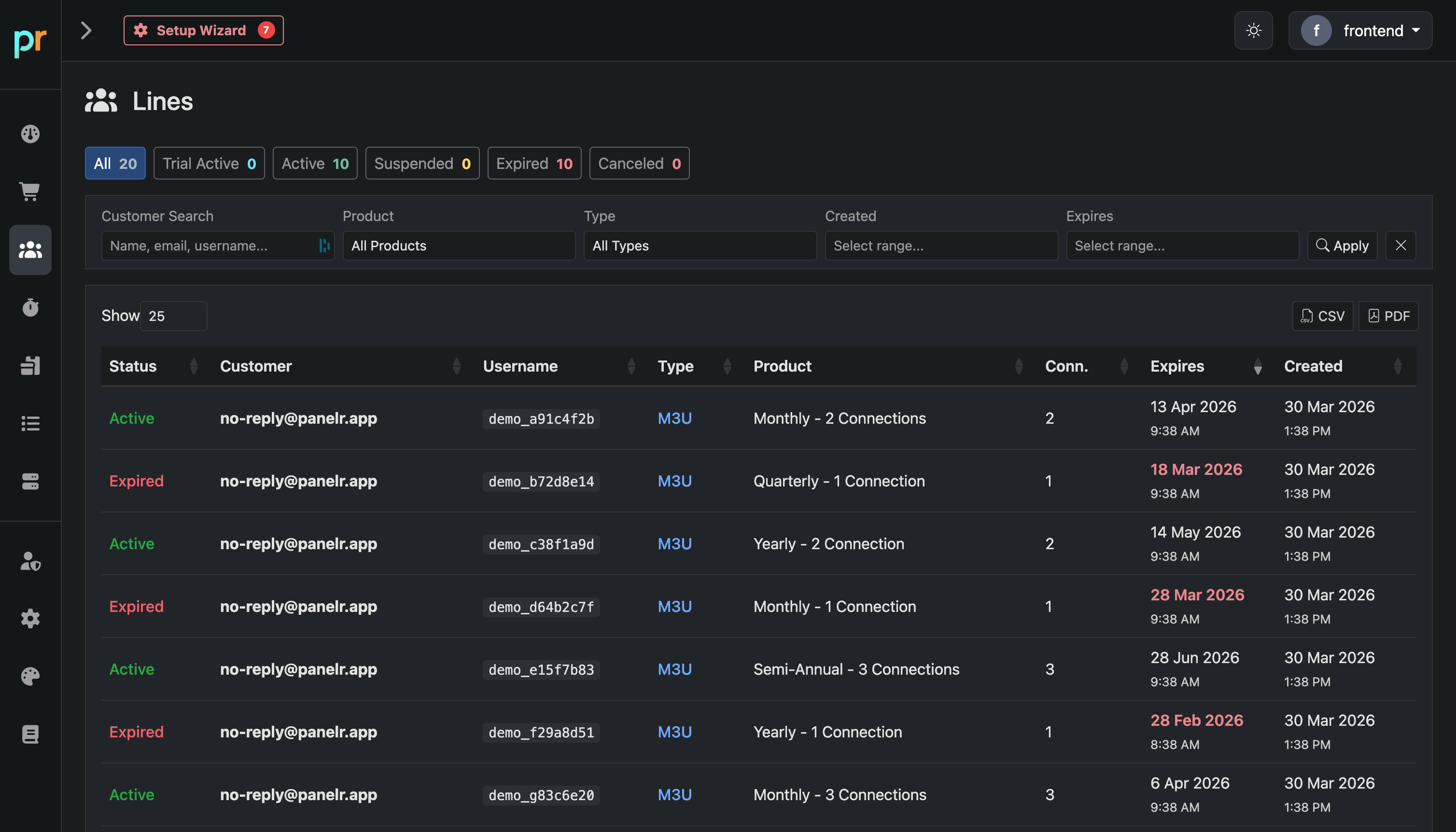
The Lines page is your central view of all customer subscriptions in Panelr. Each line represents an active, trial, expired, or canceled service tied to a customer and product.
Use this page to monitor, search, and manage all user accounts in one place.
Overview
At the top, you’ll see summary counts for:
All lines
- Trial Active
- Active
- Suspended
- Expired
- Canceled
These give you the ability to filter your customers by status instantly, then work within that group.
Filtering and Search
Use the filters to find specific lines quickly:
Customer Search
Search by name, email, or username.
Product
Filter by a specific product.
Type
Filter by connection type (e.g. M3U).
Created / Expires
Filter by date ranges.
Table Columns
Status
Current state of the line (Active, Expired, etc.).
Customer
The email or identifier tied to the line.
Username
The panel or service username.
Type
Connection type (e.g. M3U).
Product
The assigned plan (duration and connections).
Conn
Number of allowed connections.
Expires
Expiration date of the line.
Created
When the line was created.
How to Use It
- Track active and expired users
- Quickly identify users nearing expiration
- Search for a specific customer or account
- Review what product a user is on
- Export data using CSV or PDF
This page is your operational hub for managing customer subscriptions and monitoring service status at scale.